
 Computer Science
Textbook
Making Games with Python & Pygame
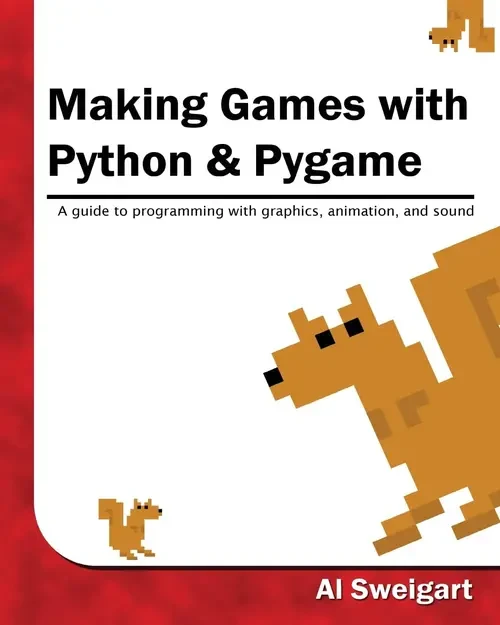
Not rated yetRate this bookMaking Games with Python & Pygame by Al Sweigart bridges the gap between knowing basic Python syntax and understanding complete graphical game programs. The 2012 first edition, marked Book Version 2 in the linked PDF, introduces Pygame before explaining seven substantial games and offering four additional games for independent code reading. It assumes some familiarity with variables, loops, functions, lists, and dictionaries. The guide follows all ten chapters and the glossary, emphasizing game state, event handling, coordinate systems, animation, collision rules, and program organization. The original cover comes from the author’s Invent with Python website.
Free reading is available at the official source. Opens in a new tab.
 Free
About this book
Making Games with Python & Pygame by Al Sweigart bridges the gap between knowing basic Python syntax and understanding complete graphical game programs. The 2012 first edition, marked Book Version 2 in the linked PDF, introduces Pygame before explaining seven substantial games and offering four additional games for independent code reading. It assumes some familiarity with variables, loops, functions, lists, and dictionaries. The guide follows all ten chapters and the glossary, emphasizing game state, event handling, coordinate systems, animation, collision rules, and program organization. The original cover comes from the author’s Invent with Python website.
Book summary
Making Games with Python & Pygame by Al Sweigart bridges the gap between knowing basic Python syntax and understanding complete graphical game programs. The 2012 first edition, marked Book Version 2 in the linked PDF, introduces Pygame before explaining seven substantial games and offering four additional games for independent code reading. It assumes some familiarity with variables, loops, functions, lists, and dictionaries. The guide follows all ten chapters and the glossary, emphasizing game state, event handling, coordinate systems, animation, collision rules, and program organization. The original cover comes from the author’s Invent with Python website.
Chapter-by-chapter summaries
Chapter 1: Installing Python and Pygame
The opening chapter prepares the interpreter, library, source files, graphics, and sounds needed to run the examples. It explains how to use the listings and why printed line numbers, indentation, and wrapped lines must be distinguished from actual source code. A program can fail before its game logic runs because an asset is missing, the working directory is unexpected, or the wrong interpreter is being used. The installation walkthrough describes 2012-era software and operating-system interfaces; use the official Python and Pygame documentation for a present-day environment rather than copying an old version requirement automatically. Begin by confirming that a minimal graphical example runs, then keep an unchanged copy of the author’s files. This separates setup problems from mistakes introduced while experimenting with the game code.
Chapter 2: Pygame Basics
A graphical program repeatedly processes input, updates its state, draws a frame, and refreshes the display. Pygame provides modules and objects for these tasks rather than automatically imposing one complete game architecture. The chapter develops the event queue, quit handling, pixel coordinates, surfaces, colors, rectangles, drawing, images, fonts, sound, and animation timing. A Surface stores an image or drawing target; a Rect supplies geometric information and useful operations but does not itself draw a picture. Blitting transfers an image to another surface, while updating the display makes the resulting frame visible. Coordinate conventions matter because screen y-values normally increase downward. Build a small program that draws one object, responds to an event, and closes cleanly, then identify which lines initialize resources and which must execute on every iteration.
Chapter 3: Memory Puzzle
Memory Puzzle represents a board of paired icons and separately tracks whether each location is revealed. That separation distinguishes the underlying game information from what the player can currently see. Nested loops construct and draw the grid, while mouse positions must be converted from pixels into board coordinates before a click can select a box. The program handles the first selection, matching or mismatching pairs, reveal and cover animations, and the final win state. Constants and assertions help express assumptions about board dimensions and available icon pairs. The chapter also discusses mutable and immutable values, readable organization, and the role of a main function. Trace two clicks through the program and list exactly which data changes after each. Then change one configuration value and predict which assumptions or calculations must change with it.
Chapter 4: Slide Puzzle
The sliding puzzle uses a board containing numbered tiles and one blank location. A legal move exchanges the blank with an adjacent tile, so input handling must distinguish the selected tile from the direction in which the blank or tile moves. The program separates the logical board from the animation that depicts a transition. Scrambling through legal moves preserves a path back to the solved state, unlike indiscriminately shuffling tiles into arrangements that may be unreachable. Move histories support features such as resetting or demonstrating a solution through reversed actions. Draw a small board, perform a move by hand, and compare the new state with the animation parameters. This clarifies why changing pixels alone does not change the puzzle and why updating the model incorrectly cannot be repaired by making the transition look smooth.
Chapter 5: Simulate
Simulate asks the player to reproduce an increasingly long sequence of four colored, sounding buttons. The program must distinguish the computer’s presentation phase from the player’s response phase, while tracking the expected position within the sequence. A correct response advances that position; an incorrect response or timing condition changes the game’s state. Button flashing and sound provide feedback, but the list of expected actions determines whether input is accepted. The example shows how keyboard and mouse interactions can be translated into the same conceptual action. Write a state trace for a three-step pattern and a deliberately incorrect response, recording the sequence, current index, phase, and relevant timing value. This exposes off-by-one errors and prevents the presentation animation from becoming confused with the rules used to assess the player’s answer.
Chapter 6: Wormy
Wormy models a continuously moving body as an ordered collection of grid locations. A new head position is added on each movement step, while the tail is normally removed; eating food changes that rule so the body grows. Direction controls must respect the game’s movement constraints, and collision checks determine whether the head has hit a boundary or the body. The model is discrete even though the display is graphical, making grid coordinates more useful than treating every occupied pixel as a separate object. Trace the head and tail updates over several steps, including one food event, before modifying the drawing code. Compare normal movement with growth and explain why the order of updating positions and testing collisions matters. A study extension is to reason about food placement and how the program should behave when very little empty space remains.
Chapter 7: Tetromino
Tetromino separates the settled board from the currently falling piece. Shape templates and rotations provide compact representations of the piece, while position and collision tests decide whether translation or rotation is legal. Gravity, held-key repetition, sideways movement, and a fast drop involve related but distinct timing rules. When a piece can no longer descend, its blocks become part of the board, completed lines are removed, and the next piece begins. Scoring and level progression then modify the challenge. Test a placement predicate at the left boundary, above the visible board, against occupied cells, and near the floor. The book also examines the limit of its falling-frequency calculation at high levels, illustrating that a formula must be interpreted together with the loop that uses it. Trace a line clear from the bottom upward to understand why row-removal order matters.
Chapter 8: Squirrel Eat Squirrel
This game moves beyond a fixed board to a scrolling world containing a player, other squirrels, and decorative grass objects. Dictionaries store the data needed for each kind of game entity without requiring the reader to build a class hierarchy. World coordinates identify positions in the larger scene; camera offsets convert them into screen positions. Object generation and removal keep the visible region populated without retaining every distant object indefinitely. Relative size determines encounters, and movement, bouncing animation, health, and temporary feedback contribute to the result. Follow one enemy from creation through movement and collision to removal, identifying which values describe the persistent world and which describe the current display. Move the camera without changing the entity’s world position to verify that camera motion is a transformation of the view rather than a change in the game’s underlying geography.
Chapter 9: Star Pusher
Star Pusher combines a tile-based puzzle with separate level files, a larger map, and a scrolling presentation. The player can push stars onto goals but cannot pull them, so a locally legal action can still create a dead end. Map data, fixed goal locations, and the changing player and star positions serve different purposes and should not be collapsed into one undifferentiated picture. The program parses text levels, validates basic requirements, decorates the map, handles movement, detects completion, and supports restarting. Flood-fill reasoning helps identify connected areas for visual treatment. Distinguish a structural level check from proof that a puzzle is solvable: having enough stars and a start position is necessary but not sufficient. Create a tiny level, trace a push into a corner, and explain how restarting restores the initial state without altering the stored level definition.
Chapter 10: Four Extra Games — independent source-code study
The closing chapter supplies commented code for Flippy, Ink Spill, Four-In-A-Row, and Gemgem without the line-by-line explanatory treatment used for the preceding games. It expects readers to transfer the earlier methods to unfamiliar programs. Begin by locating initialization, the central loop, input handling, state transitions, rendering, and win or loss checks in each listing. The author also points to deliberately buggy versions as debugging exercises. The four game notes below summarize their distinct learning opportunities; they are subdivisions of Chapter 10, not additional numbered chapters in the source. Resist reading every line in order before understanding the program’s overall structure. A useful first deliverable is a short map of the major functions and the game data they inspect or modify.
Chapter 10 game focus: Flippy
Flippy implements an Othello-style board game in which a legal placement can capture opposing tiles along qualifying lines. Move validation must identify the resulting flips without accidentally changing the real board while merely exploring possibilities. The computer opponent introduces a decision-making layer on top of the same legal-move rules used for the human player. Separate the question of whether a move is permitted from the question of how attractive it is. Trace a placement that flips tiles in more than one direction, then examine a boundary case where no enclosing friendly tile exists. Compare the board before and after evaluating a hypothetical move. This is a practical way to detect unintended mutation and to understand why a game-playing heuristic is different from the rules that define legal play.
Chapter 10 game focus: Ink Spill
Ink Spill applies flood-fill behavior to a colored grid. A selected color changes the connected region reached from the starting area, potentially absorbing neighboring cells of the newly chosen color. Connectivity, rather than matching color anywhere on the board, determines which cells belong to the current region. The game adds a limited resource of moves or life and a test for whether the board has become uniform. Trace a small board with two separate areas of the same color to show why one can change while the other remains unaffected. Then inspect how the implementation avoids revisiting cells indefinitely. This exercise links a visually simple game with an algorithm used more broadly in image editing, region finding, and grid exploration.
Chapter 10 game focus: Four-In-A-Row
Four-In-A-Row combines gravity-constrained placement with horizontal, vertical, and diagonal victory checks. A column selection does not directly specify the final row; the board state determines where the piece comes to rest. The computer opponent must consider possible moves while respecting the same placement and win rules. Examine how hypothetical states are constructed and evaluated, keeping them separate from the actual current position. Build test boards for each winning direction, a nearly complete line, a full column, and a filled board without a winner. These cases expose boundary and indexing errors more reliably than repeatedly playing from an empty board. Explain the difference between detecting an immediate win and evaluating a move that may create a longer-term opportunity.
Chapter 10 game focus: Gemgem
Gemgem uses a grid of gems whose neighboring positions can be swapped to create qualifying matches. A successful action can trigger removal, falling gems, replacements, and further matches, so one user input may initiate several internal transitions. Those transitions must remain coordinated with animation and scoring. Separate the stable board awaiting input from an intermediate board that is resolving a match. Trace one swap through validation, match detection, removal, refill, and any subsequent cascade, then compare it with a swap that produces no match. Pay attention to how overlapping or adjacent groups are counted and how the program determines whether another move exists. This final example reinforces the book’s broader lesson: a game is a sequence of well-defined state changes, not merely a collection of drawings that respond to clicks.
Glossary and About the Author
The glossary revisits programming and Pygame vocabulary, while the closing author section provides background. Use the glossary to connect a term with one concrete function or data structure in a game you have studied. The book’s progression is deliberately based on complete programs, so revisiting an earlier listing after a later chapter often reveals patterns that were initially hard to see. Maintain a small personal index connecting ideas such as event queue, board coordinates, camera, mutable data, and collision checks with their examples. The glossary and author biography are reference and closing material rather than extra games or teaching chapters.
Study instructions
- Confirm that the official Pygame setup works with your chosen Python interpreter before attempting a full game. Keep source code and required assets together and preserve a clean baseline copy.
- Master Chapter 2 by writing a minimal event loop that handles closing, updates one variable, and redraws the result. Explain the role of surfaces and rectangles separately.
- For every game, diagram the stored state, input actions, legal transitions, and win or loss conditions before reading individual drawing routines.
- Trace one normal action and one boundary case on paper. Include coordinate conversion, collision rules, timing, and any list or dictionary mutation involved.
- Make one small change at a time, predict its effect, and compare the outcome. Distinguish a missing asset or environment problem from an error in game rules.
- Use Chapter 10 as an independent reading and debugging project. Reuse earlier concepts to map the functions, then explain a complete turn or match sequence without looking at the commentary.
Questions for reflection
- How is the logical state of a game different from the pixels showing it?
- Which values are board coordinates, world coordinates, or screen coordinates?
- When should evaluating a possible move leave the actual game state unchanged?
- How does event processing differ from continuous movement or timed updates?
- Which boundary case would most directly test a particular collision or victory rule?
Sources and coverage
This original reading guide follows the linked source edition’s chapter, module, unit, or lesson structure. Consult the source for full arguments, cases, worked examples, exercises, illustrations, and references. Coverage follows all ten chapters and the glossary in the 2012 first edition, Book Version 2. Chapter 10 contains four commented programs rather than four fully explained chapters; the focus notes are original study aids. The original author-site cover is used. For updated setup guidance consult https://www.pygame.org/wiki/GettingStarted and https://www.pygame.org/docs/. Read the source edition.
Author’s book page and original cover · Official Pygame setup guidance · Official Pygame documentation.
About access & copyright
This page provides book information and study material. Full-text access is provided by the original publisher or authorised source; a listing does not grant permission to republish the book.
Read our Library Access & Copyright policyExplore the contents
Check the chapters covered in this edition.
Visit the official source
See reading, preview or purchase options.
Save for later
Keep this textbook in your saved collection.
Reader ratings & reviews
Share your thoughts
Your review helps other students choose the right resources.
KEEP LEARNING
Your next great read
Computer Science Computer Science
Relational Databases and Microsoft Access
View Relational Databases and Microsoft Access — book Computer Science
A Guide to MATLAB
View A Guide to MATLAB — book Computer Science
Introduction To MIPS Assembly Language Programming
View Introduction To MIPS Assembly Language Programming — book Computer Science
Java, Java, Java - Object-Oriented Programming
View Java, Java, Java - Object-Oriented Programming — book Computer Science
Think Java - How to Think Like a Computer Scientist
View Think Java - How to Think Like a Computer Scientist — book Computer Science
Think Python - How to Think Like a Computer Scientist (Downey)
View Think Python - How to Think Like a Computer Scientist (Downey) — book Computer Science
High Performance Computing
View High Performance Computing — book Computer Science
Foundations of Computation
View Foundations of Computation — book Algorithms and Data Structures